SESSION NOTE 01 / DELAY
Dotted Eighth Delay: Milliseconds, Rhythm & Setup
Place the repeats between the beats. Set the time in milliseconds or use your pedal’s note division.
THE SHORT ANSWER
A dotted eighth delay lasts three-quarters of a quarter-note beat. Divide 45,000 by your BPM to get milliseconds. At 120 BPM, that is 375 ms. With tempo sync, choose a dotted eighth division and use the song’s quarter-note tempo.
Try 120 BPM · dotted eighth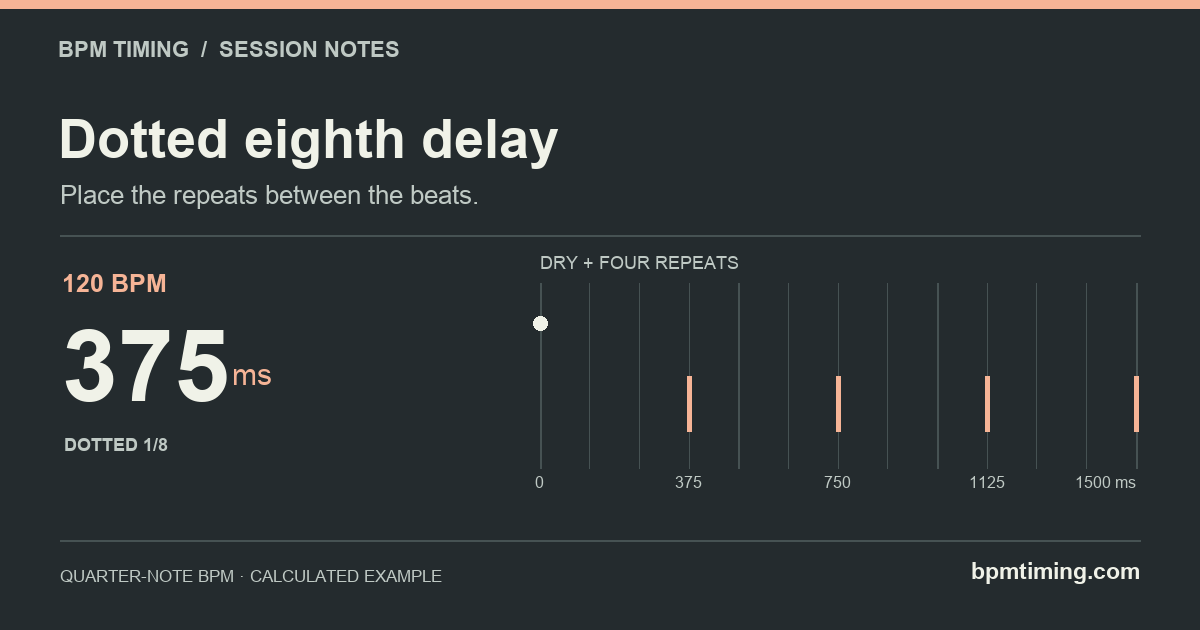
Where the repeats land
A straight eighth spans two sixteenth-note steps. A dotted eighth adds one more step, so each repeat arrives after three steps. That difference creates a repeat pattern that moves across the quarter-note beat positions.
Swipe the diagram to follow the full timeline.
At 120 BPM, sixteenth-note steps are 125 ms apart. The first echo arrives at 375 ms, just before beat 2 at 500 ms. Further echoes of that same input arrive at 750, 1125 and 1500 ms. Four delay intervals span three quarter-note beats.
If you play repeated notes, each new note starts its own chain of echoes. The diagram isolates one note so you can see the spacing; it does not promise that every echo will fall into an empty gap in your performance.
Set it on a plug-in or pedal
- Find the project’s quarter-note BPM. Use the tempo already set in your DAW. If a score marks a dotted-quarter beat, convert it first: dotted-quarter = 80 means quarter-note = 120.
- Choose the right time mode. With host sync, select the dotted eighth division, often shown as 1/8 D or a dotted note symbol. With a millisecond control, enter the calculated value instead.
- For tap tempo, check the tap division. If your pedal converts quarter-note taps to a selected dotted eighth, tap the quarter-note pulse. A pedal that measures the raw delay interval needs a different tapping pattern; do not assume every tap switch works the same way.
- Check the spacing with a short note. Start with few repeats and an audible wet level, then play against the project grid. Adjust feedback and mix after the timing is right.
For a documented hardware example, Strymon’s DIG subdivision instructions explain how its tap tempo can produce quarter, dotted eighth or half-note delays. The BOSS DD-8 reference manual also describes quarter-note tapping with a dotted eighth tap division. Follow the controls for your own model; these are documentation examples, not hands-on tests of those pedals.
Open 128 BPM · 351.563 msStraight, dotted or triplet?
At the same BPM, a dotted eighth is longer than a straight eighth. An eighth-note triplet is shorter. Selecting “triplet” because it sounds like “three” will not produce dotted timing: the three refers to fitting three notes into the space of two.
Swipe the table to compare all columns.
| Tempo | Straight 1/8 | Dotted 1/8 | Triplet 1/8 |
|---|---|---|---|
| 80 BPM | 375 | 562.5 | 250 |
| 100 BPM | 300 | 450 | 200 |
| 120 BPM | 250 | 375 | 166.667 |
| 128 BPM | 234.375 | 351.563 | 156.25 |
| 140 BPM | 214.286 | 321.429 | 142.857 |
| 160 BPM | 187.5 | 281.25 | 125 |
The formulas are 30,000 ÷ BPM for a straight eighth, 45,000 ÷ BPM for a dotted eighth and 20,000 ÷ BPM for an eighth triplet. These are calculated even subdivisions, without swing or groove offsets.
At 128 BPM, the exact dotted eighth is 351.5625 ms. The table displays 351.563 ms; the calculator’s copy action keeps more precision. If your device only accepts whole milliseconds, 352 ms is the nearest setting, with a small timing difference.
When the rhythm still feels wrong
- The delay reinforces the beat instead of crossing it.
- Check for a quarter-note setting or a missing dot. At 120 BPM, 500 ms is a quarter note; 375 ms is the dotted eighth.
- The setting works until the song changes tempo.
- A fixed millisecond value does not follow tempo changes. Use host or clock sync if supported, or recalculate for the new tempo.
- The pattern sounds crowded.
- Test one isolated note again. If its repeats are correctly spaced, the issue may be overlapping performances or too many repeats. BPM determines the interval, not the ideal feedback or mix.
- The pedal has only an unmarked time knob.
- The number is still a reference, but the knob cannot guarantee an exact millisecond setting. Match the repeats against the project beat and check the device’s available delay range.
Need the underlying definitions? Read the calculation method. For timing a reverb onset instead of separate echoes, see the pre-delay guide.
Sources & calculation notes
Sources checked October 31, 2026. Numerical tables use the formulas and precision described in our method, using the same math as the calculator. Device references describe documented behavior; they are not claims of hands-on testing or affiliation.